The Predictions page
The daily model output for every covered fixture: how the date strip, market tabs, day overview, filters, and result states work together.
Open Predictions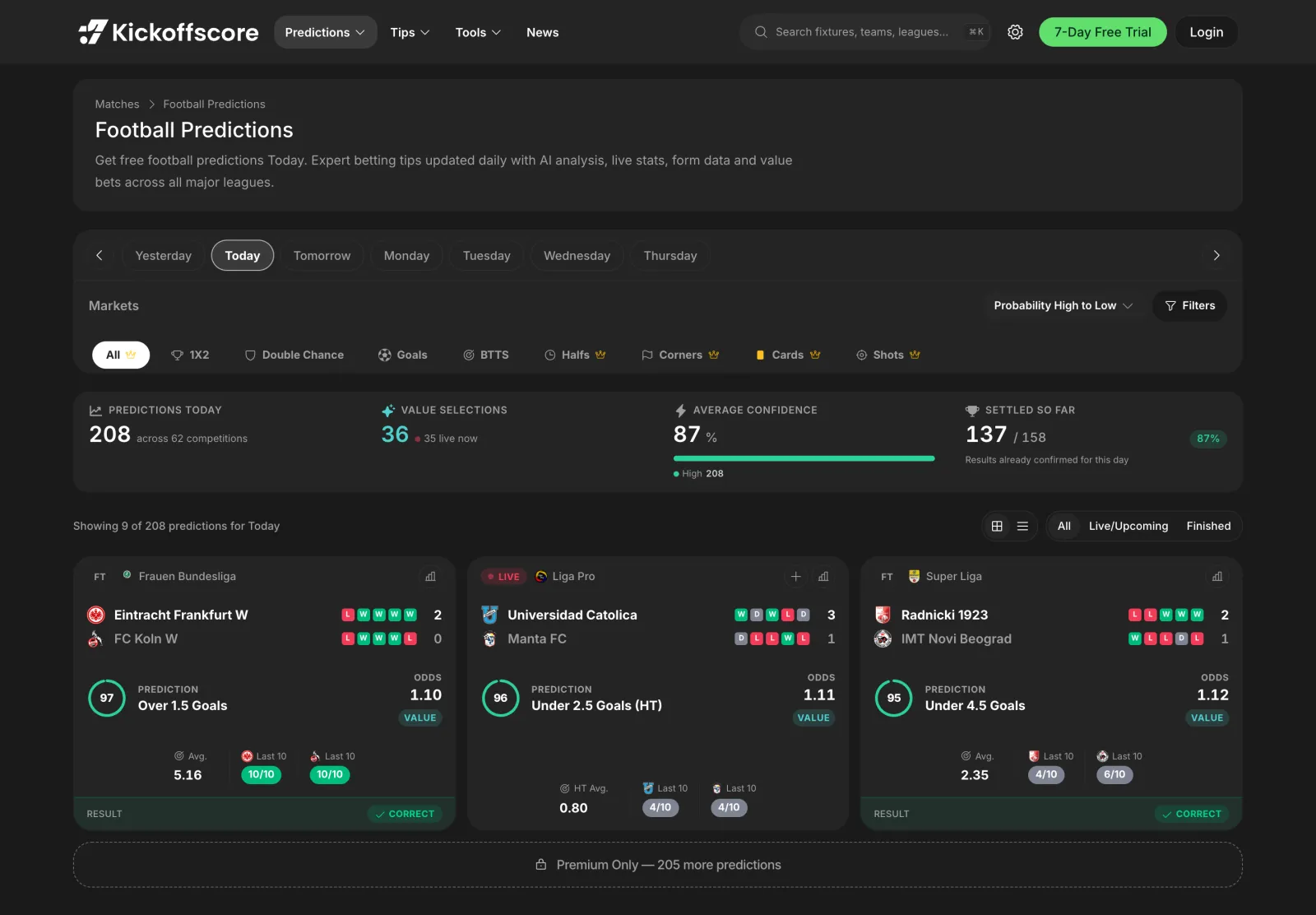
Predictions is the centre of the product. For every fixture the model covers, it publishes a probability for each market it supports, picks out the strongest selection, and shows the bookmaker price next to it so you can see whether the price and the probability disagree.
The page is a single list with four layers of control stacked above it: the date, the market, the day overview, and the filters.
1. The date strip
Yesterday, Today, and Tomorrow sit at the front, followed by named weekdays. Yesterday and earlier days are useful in a different way to the future days: past predictions carry their settled result, so the same list becomes a record of what the model called and whether it landed.
Coverage window
Predictions are published for matches inside the next six days. A fixture further out than that will show as scheduled without a prediction until it enters the window.
2. Market tabs
The market row filters the entire list down to one market. All shows every available selection across supported markets. Individual market tabs show one leading selection per fixture within that market.
| Tab | What it covers |
|---|---|
| All | The best qualifying selection per fixture, across every market |
| 1X2 | Match result: home, draw, away |
| Double Chance | Home or draw, draw or away, home or away |
| Goals | Total goal lines, from over/under 0.5 up to 3.5 |
| BTTS | Both teams to score, yes or no |
| Halves | Half-time result, half-time goal lines, and BTTS by half |
| Corners | Total and team corner lines |
| Cards | Total and team card lines |
| Shots | Shots and shots on target, total and per team |
Crowned tabs are premium
Halves, corners, cards, and shots carry a crown on the tab. The core markets stay open to everyone, and the free list also caps how many of the day’s predictions you can open.
3. The day overview
The strip under the tabs summarises the day before you scroll a single card.
- Predictions today
- How many predictions exist for the selected day, and across how many competitions.
- Value selections
- How many of them the model rates as priced above their fair value, with a live count for matches in play.
- Average confidence
- The mean model probability across the listed selections, split into high, medium, and lower bands.
- Settled so far
- How many of the day’s predictions already have a confirmed result, and the share that were correct.
4. Sort and advanced filters
Sorting covers probability high to low, probability low to high, and odds in either direction. Sorting by odds high to low with a probability floor applied is the fastest way to surface longer prices the model still rates.
Advanced Filters adds the harder constraints: a probability range, an odds range, and league or country selection with a searchable list. Active filters appear as removable badges above the list, and Clear All resets them in one action.
Reading a prediction card
- Confidence ring
- The model probability for the named selection, from 0 to 100. Read it literally: 78 means the model expects that outcome roughly 78 times in 100.
- Prediction
- The selection itself, written in market language, for example Over 1.5 Goals or Draw or Away.
- Odds
- The bookmaker price for that selection in your chosen odds format.
- Value tag
- Shown when the model probability is higher than the probability implied by the price. It marks a gap, not a guarantee.
- Supporting stats
- The season average for the market and each team’s hit rate in their last ten matches, so you can see whether the underlying form agrees with the model.
- Form dots
- The last five results for each team, most recent last.
- Result
- On settled fixtures the card is stamped correct or incorrect against the actual outcome.
Grid, list, and status filters
The two icons above the list switch between the card grid and a denser row list, which is the better view when you are scanning a long day. Next to them, All, Live/Upcoming, and Finished filter by match status, so you can hide everything that has already kicked off.
Direct market pages
Every market also has its own address, which is what the footer links point at. They open the predictions list pre-filtered to that market, and they are the pages to bookmark if you only ever bet one thing.
- /predictions/1x2 and /predictions/double-chance
- /predictions/btts
- /predictions/over-under-1-5-goals, /over-under-2-5-goals, /over-under-3-5-goals
- /predictions/handicap, /predictions/corners, /predictions/cards
- /predictions/value-bets for the value-tagged selections only
- /predictions/tomorrow and /predictions/yesterday for the neighbouring days
Why does a fixture appear under All with one market and under a market tab with another?
All shows the single strongest qualifying selection for that fixture. A market tab shows that fixture’s number for the market you picked, even when the model prefers a different market entirely.
A prediction changed between yesterday and today. Is that a bug?
No. Predictions are regenerated as new information lands, including lineups, market movement, and updated form. The last published value before kick-off is the one the result is scored against.
Why is there no prediction for a match I can see in the fixture list?
Either the fixture is outside the six-day window, or the competition does not yet have enough reliable data behind it for the model to publish. Coverage follows data quality rather than popularity.
Related guides
- Match page predictionsThe per-fixture view: expected goals, goal distribution, the full market ladder, and the tabs that hold the evidence behind the number.
- Value BetsSelections where the model probability exceeds the probability implied by the price, filtered so recent trends support the same market.
- Prediction AccuracyThe scoreboard for the model itself: accuracy by competition and market, monthly breakdowns, and tracked value-bet ROI and closing line value.